Going Paperless with Django
How building a custom record keeping software with Django helped a manufacturing firm save significantly on archival and operational costs.

A manufacturing firm in the Philippines had relied on manual, paper-based workflows for the past 45 years. On-field technicians would carry a stack of checklists on a clipboard as they execute their daily operations. These checklists would then be compiled, processed, and stored for archival. As archival costs rose and error remediation became a blocker for daily work, the firm explored modernization options to streamline their processes.
In this document, I’ll describe how I planned, architected, and executed a custom Django solution that allows the firm to go paperless.
Disclaimer: This post looks at the architecture in a high-level manner, and is intentionally generic to not disclose any client-specific information. Certain details such as networking specifics and code-level architecture are omitted for brevity.
Background
The firm’s daily operations revolve around three key concepts:
- A
TechnicianvisitsMachinesacross multipleLocations, where they fulfill aChecklistthroughout the day. - The contents of a
Checklistare dynamic in nature: it depends on what type ofMachineis being inspected, whichLocationit resides, what operations are expected on the current season, and half a dozen of other variables. - A
Checklistis then submitted to aManagerfor analysis. Multiple levels ofManagersare involved in a chain of approvals — until it finally getsFinalizedand stored for archival.
With hundreds of Technicians working on thousands of Machines, the data being generated is no longer manageable with paper workflows. On top of that, the nature of paper documents makes archival a hard problem to solve as documents perish within a few years.
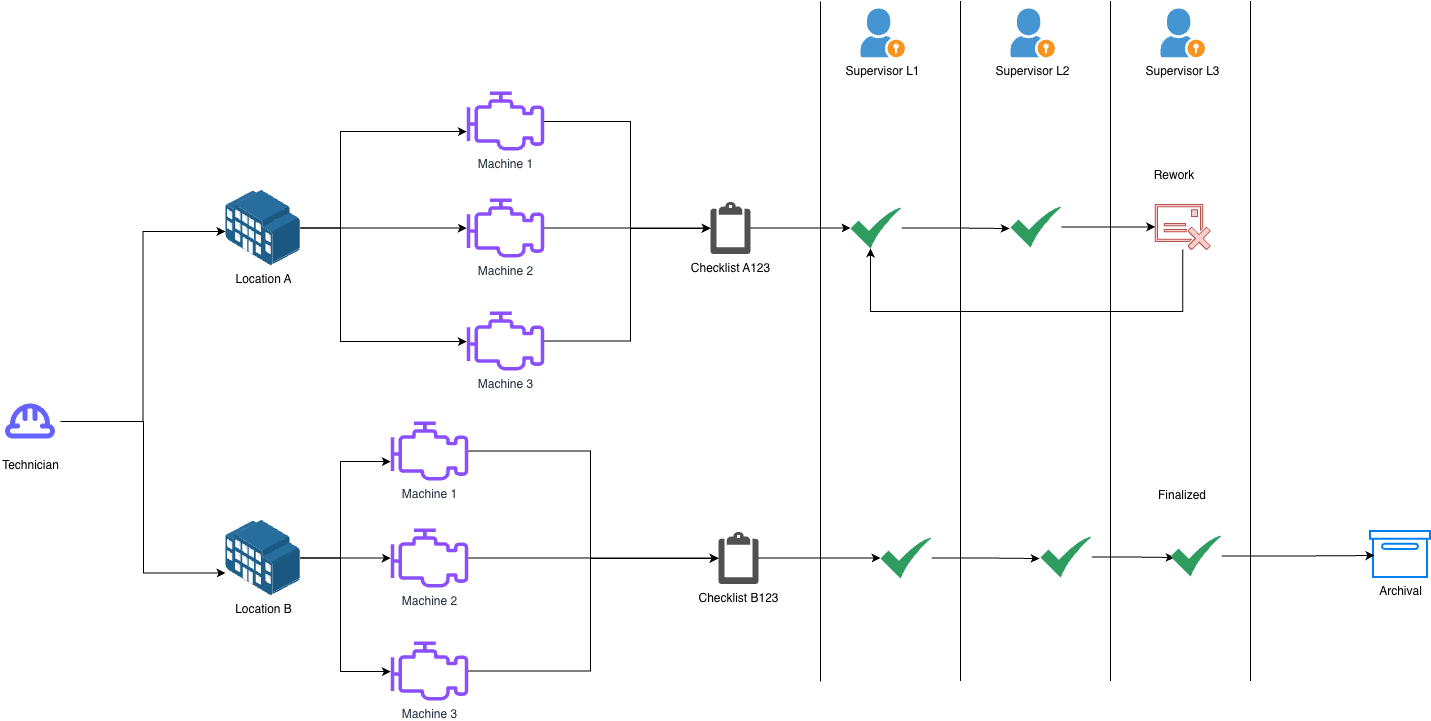
The diagram above illustrates the core flow. A Technician generates a Checklist per location visited. That checklist then travels up three levels of supervisors. At any level, a supervisor may approve it, send it back down with a revision note, or perform the revision themselves. Only once the highest level supervisor approves does the checklist become Finalized and eligible for archival.
This flow, done entirely on paper, introduced significant friction. Supervisors handling large stacks of physical documents had no reliable way to track where a checklist was stuck, who had touched it, or whether a revision had been addressed. Consolidating data for monthly reporting required a full week of manual data wrangling by the back office.
System Design
The goal was to digitize this existing workflow while making it resilient for field conditions as locations are usually with weak or no mobile signal.
Checklist Engine
The most technically interesting challenge was modeling the dynamic nature of checklists. A checklist’s structure is not fixed. It is based on the machine type, location, season, and other factors. To handle this, I designed a custom versionable file format that defines checklist templates declaratively.
A key design decision here was that a checklist is always tied to exactly one version of its template. Versions are explicitly not guaranteed to be forwards or backwards compatible with each other. This was intentional: it ensures that a finalized checklist is an immutable record of what was asked and answered at that point in time. Attempting to retrofit an old checklist onto a new template would compromise its integrity as an archival document.
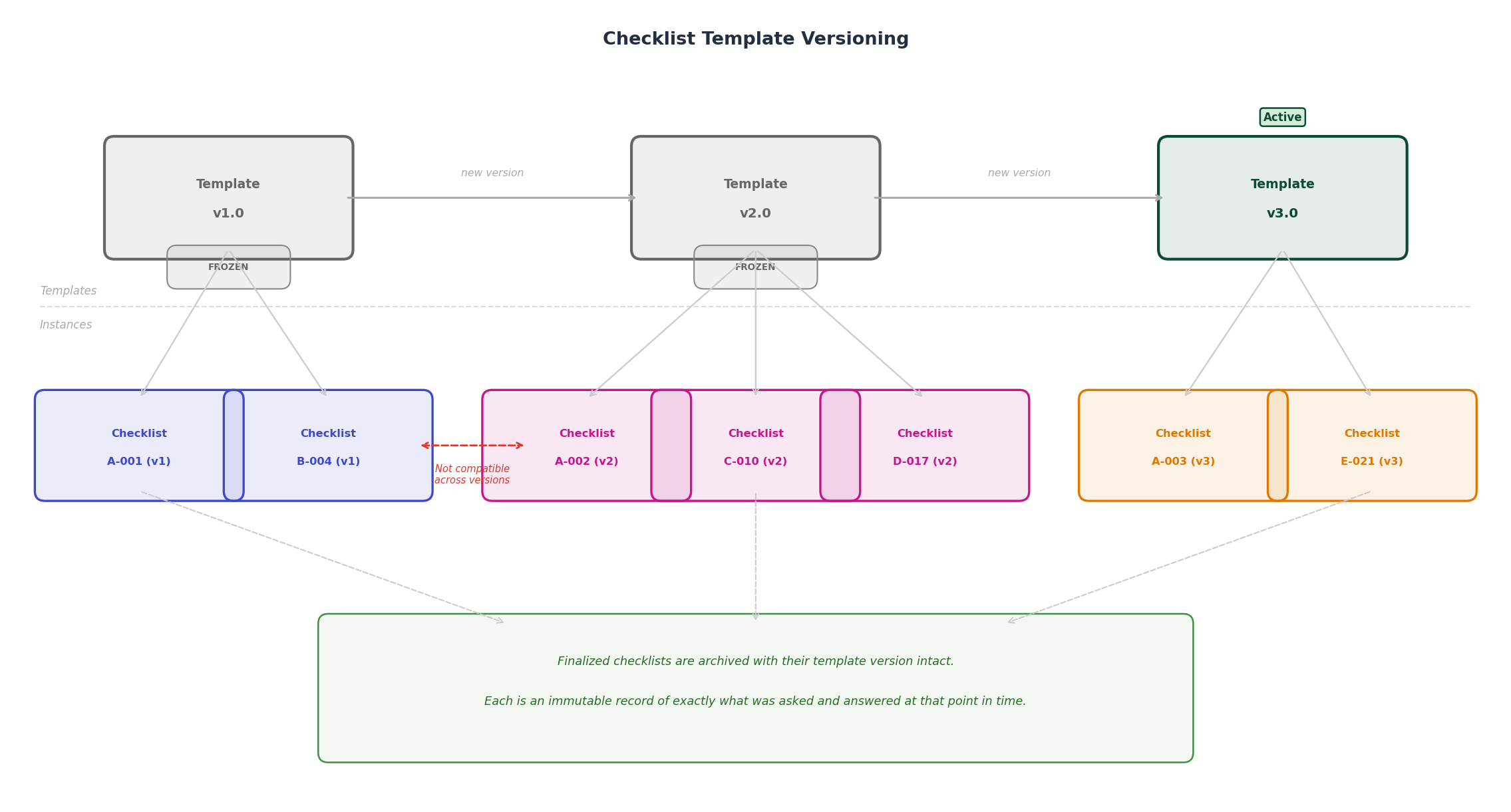
Template versions are originally stored as flat-files. But version upgrade rate had increased with the initial pilot so we exposed an admin UI, giving back-office staff the ability to author and publish new checklist definitions without extra development. Internally, each published version is stored and frozen — existing in-flight checklists are unaffected when a new version is released.
Offline-First Field Experience
Technicians operate across facilities that sometimes have limited or no mobile signal. A solution that requires a live internet connection would be a non-starter. The web application was built to function offline, which allows technicians to fill out and save checklists locally on their phones. Submissions are queued and synced automatically once connectivity is restored.
This removes dependency on network availability, which was one of the primary concerns raised during discovery.
Approval Workflow
The multi-level approval chain is modeled directly in the application. Each supervisor level can take one of three actions on a submitted checklist:
- Approve — passes it up to the next level, or finalizes it if at the top.
- Reject with notes — sends it back down one level with a revision message.
- Revise directly — the supervisor makes the correction themselves and passes it upward.
Every action taken on a checklist is recorded. This audit trail was a significant improvement over paper, where determining accountability required interviewing people. The system now makes it immediately visible which locations, machines, or supervisors a checklist tends to get stuck on — enabling the firm to address systemic issues rather than just individual errors.
AWS Architecture
The application is hosted on Amazon Web Services (AWS). The Django application runs on an Amazon EC2 instance, with Amazon RDS for PostgreSQL handling data persistence. Media and static files are stored in Amazon S3, and DNS is managed through Amazon Route 53.
Report generation is handled by a scheduled job — leveraging Amazon EventBridge to trigger a report-building task over the weekend. The output is a structured PDF available in the dashboard, replacing the week-long manual process entirely.
A basic CI/CD pipeline was built on GitLab CI + Ansible and Terraform to handle deployments, though the infrastructure itself was not a primary focus of this engagement.
Results
The impact was measurable across several factors:
- Report generation dropped from approximately one week of manual effort to effectively zero overhead as it is now handled by an automated weekend job.
- Audit and accountability improved significantly. The audit module gives stakeholders full visibility into the lifecycle of every checklist, eliminating the ambiguity that previously led to blame-shifting between teams.
- Error remediation is now a core part of the workflow rather than a blocker and an afterthought. While we did not formally track error rates prior to launch, the structured revision cycle ensures corrections are documented, traceable, and resolved.
- Archival costs were reduced significantly. Digital records do not degrade, require no physical storage space, and are searchable — addressing a cost that had been compounding for decades.
Conclusion
In this post, we explored how a purpose-built Django application can faithfully digitize a complex, paper-based operational workflow. The key was designing the system around the real constraints of the environment: dynamic checklist structures, offline field conditions, multi-level human workflows, and long-term archival.
At a glance:
- Report generation reduced from ~1 week to zero manual overhead
- Full audit trail replacing manual accountability tracking
- Offline-capable field experience for low-connectivity locations
- Immutable, versioned checklist records for archival integrity
- Significant reduction in long-term archival and operational costs
Future Improvements and Retrospective
This engagement gave me a valuable lesson on the importance of discovery upfront. I was contracted directly by the back office and was given sufficient resources to work independently, which allowed for fast execution. However, near the tail end of the project, IT became involved and I discovered the firm is predominantly a Microsoft shop. Knowing this upfront, I would have seriously considered a .NET-based solution to better align with their existing internal expertise and long-term maintainability expectations.
The second lesson came from the scale of data the system generated in production. The estimates I was given during discovery were rough, and a few months after launch the dashboards began experiencing performance issues as the volume of checklist data grew. In hindsight, I should have invested more time during initial discovery to further understand data intake patterns and identify which dashboard figures could be pre-computed and cached. Treating the dashboards as a read-heavy reporting problem from the start would have been the right call.
Both of these are ultimately discovery failures: things that better upfront research and alignment would have surfaced before they became problems. That’s a practice I’ve since carried into every new engagement.